The Hour Claude Got Lost in UAT
By Rob Chipman
I was an hour into a UAT session when I realized the problem wasn't in the ticket I was testing.
Claude was playing the author. The scenario was simple enough on paper: create a new entity (a character that hadn't appeared before) and link it to a scene. I watched.
Claude tried six different ways to create that entity. None of them worked.
Why AI is running my UAT
AxiomWeaver is built by one developer using Claude as a coding partner. That's documented. What I've been doing less publicly is having Claude also run my UAT sessions, playing the role of a new author trying to complete specific story scenarios in the app.
The logic is simple. Claude doesn't have muscle memory. It doesn't remember which panel opens from which menu. It doesn't know my shortcuts. It has to discover features the way a new author would: by looking at the UI and guessing.
If Claude can't find a feature, a real author who just downloaded the alpha isn't going to find it either. They'll close the app, assume it's half-built, and move on.
Six wrong paths
Every path Claude tried was a reasonable guess. That's the painful part.
It tried right-clicking on selected text in the manuscript, hoping for an "Add to Lexicon" option. (I actually have that! But Claude's cursor was in the wrong block, or the selection wasn't clean, or the context menu didn't surface the option on that element.)
It tried typing the new character's name into prose and waiting for the system to offer to create an entity. (The entity scanner does detect new names. It doesn't auto-prompt to create; it just highlights. Close, but not what Claude needed.)
It tried looking for a "+" button in a sidebar. It checked the chapter tree. It checked the codex panel. It checked the top toolbar.
It tried the command palette. That actually works (there's a "Create entity" command), but that's a power-user path. A new author doesn't know the command palette exists for twenty sessions.
It tried opening World Builder, assuming entity creation lived there. Got into World Builder, then couldn't tell which surface was for creating a new entity vs. editing an existing one.
It tried asking me. That was the moment.
Six different gaps, not one
If Claude had failed on one path, I'd fix one thing. Six failures meant six different gaps, each one a separate design decision I'd made without fully thinking about how the user would actually approach the task.
VS Code figured this out years ago. You don't remember which ⌘-shift-P opens the extensions panel; you click the icon in the activity bar on the left. Always there, always in the same place. Writing tools have mostly ignored the app shell as a design surface.
Every feature is a menu item, a custom shortcut, or worse, a custom-event that doesn't advertise itself. AxiomWeaver was no different, until UAT showed me what it was costing.
Over the last few weeks I've shipped fixes for most of these paths, each one addressing a different version of the problem:
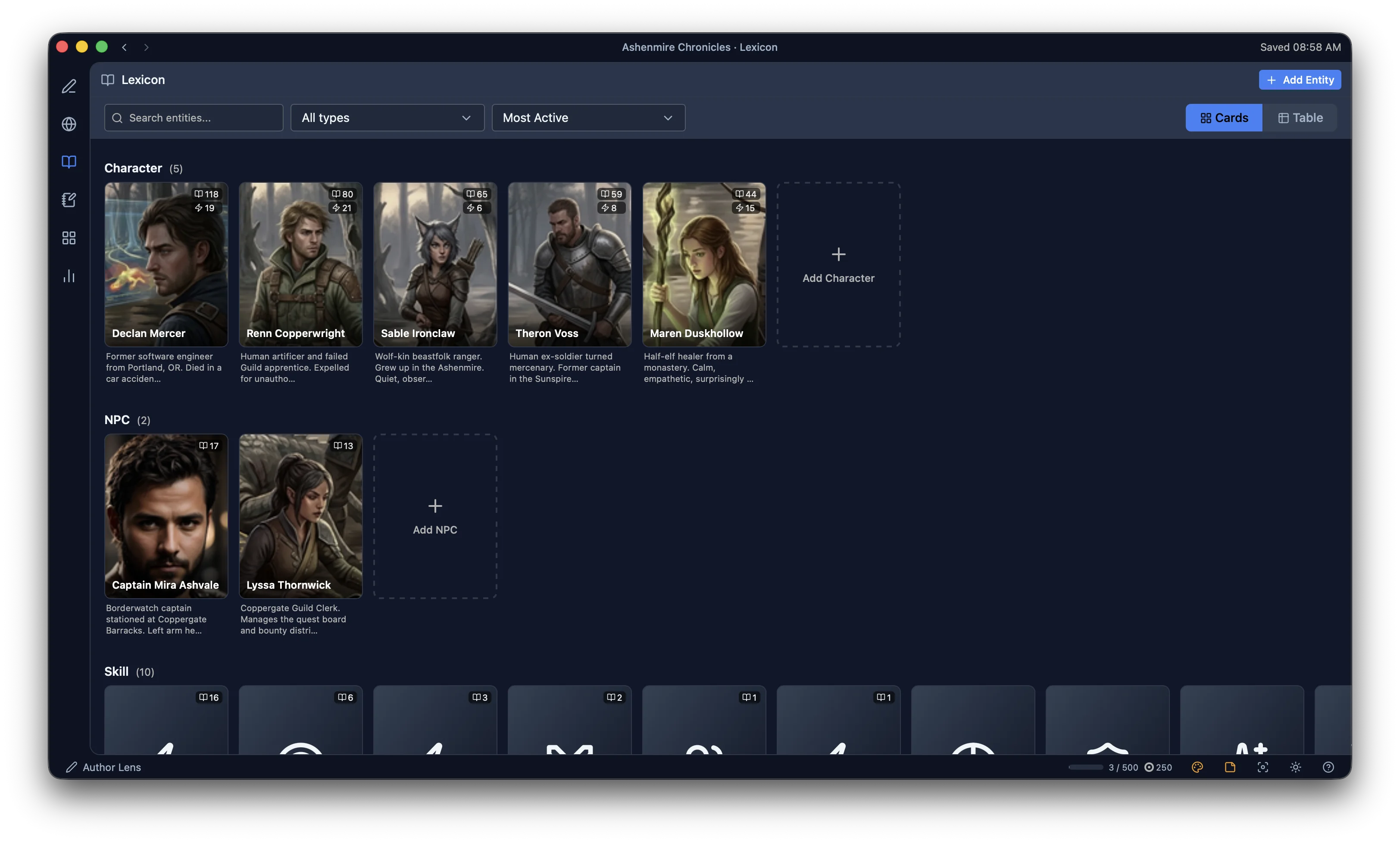
- A visible navigation rail on the left edge of the app, a VS Code–style activity bar with icons for the Editor, Codex, Lexicon, Author Notes, Corkboard, and Progress view. One click switches views. No more custom-event archaeology to find where a feature lives.
- A proper Lexicon view with a Netflix-style browse pattern and inline detail. If you want to see or create an entity, you go to the Lexicon. That's the answer. It didn't used to be.
- A section-based guided tour that doesn't try to teach the whole app at once. Walk through one surface when you need it, ignore the rest until later. Zero-forced-tutorial policy.
- Better affordances for selection-based creation: right-click a highlighted name in prose, get "Add to Lexicon" as the first option. Still tuning which selections qualify.
Entity creation is still an active area. The wizard flow for a brand-new entity (pick a template, fill in the fields, link to a scene) is still more opaque than it should be. I'm working on it. UAT will keep showing me where the seams are.
What AI UAT catches that human UAT might miss
Human UAT testers bring knowledge. They've seen apps before. They know that if they can't find a feature, they should check the hamburger menu or right-click something or hit ⌘-K. They forgive discoverability gaps because they pattern-match to other software.
Claude in a UAT session has no charity. It tries what the UI obviously shows, then tries the reasonable second guess, then the reasonable third. The silence where it stops guessing (or worse, the moment it asks me) is the signal. That's a gap real users will fall into too. They'll just blame themselves for it and quietly leave.
I could find these gaps without Claude. Eventually. Probably the first time someone on Royal Road posted "I downloaded the alpha but I couldn't figure out how to add a character, is this app broken?" Which, if I'd shipped without the activity bar, the new Lexicon, the tour, they definitely would have posted.
Claude going quiet saved me from that post. Maybe from several.
The test that matters is still ahead
None of this replaces real users. Me and Claude doing UAT is a useful dress rehearsal. It catches the design gaps where the UI obviously breaks on first contact. But Claude isn't writing a 200-chapter LitRPG. I'm not writing one either. I'm simulating what an author might need, and a simulation isn't the same as an author 80 chapters into a serial, with a deadline, a messy manuscript, and real creative stakes.
That's the test that actually matters, and the alpha is close. I've been building this for months and I'm curious what real authors find. Whatever I've missed in UAT, they'll find it. The things I think are obvious will turn out not to be. The things I've labored over might matter less than I think. That's the whole point of getting it into real hands.
Call the AI-UAT the unglamorous part of the work. Not "AI writes your code." Not "AI generates user flows." Just an eager, memoryless reviewer who'll try every wrong thing and go quiet when the obvious thing isn't obvious. The silence is the bug report. It's a useful dress rehearsal. Nothing more, nothing less.
The alpha ships soon. If you're writing LitRPG or progression fantasy and the cognitive tax of tracking everything is wearing you down, join the waitlist and I'll send you the download when it's ready. I want to see what you find that Claude didn't. Or come talk shop in Discord. The UAT stories get weirder than this one.